




Leader High Availability/Failover
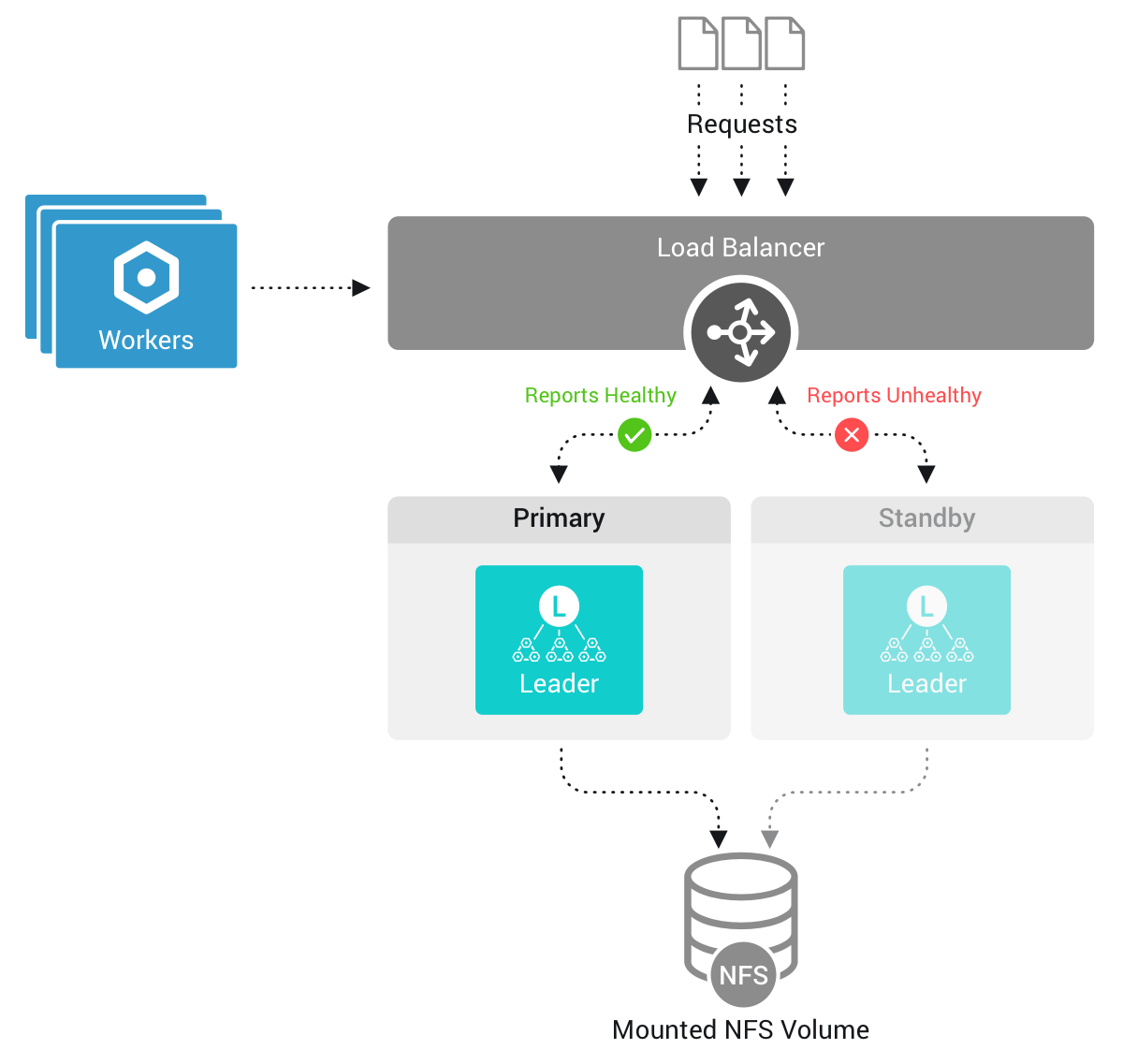
To handle unexpected outages in on-prem Distributed deployments, Cribl Stream supports configuring standby Leaders for failover. In this High Availability (HA) scenario, if the primary Leader goes down, one of the other Leaders, called standby Leaders, take its place. This ensures continuity of operation, including functions that require the Leader, such as Collectors and Collector-based Sources, which can ingest data without interruption.
Cribl.Cloud handles High Availability and configuring standby Leaders automatically, requiring no configuration or action on your part.
For license tiers that support configuring standby Leaders, see Cribl Pricing.
Primary and Standby Leaders
Only one Leader Node can be active at any given time, typically the primary Leader. A standby Leader (or Leaders) will become active only in the event of failover, when the primary Leader becomes unavailable.
The primary Leader stores its configurations and its git repository on the local disk. All changes to configurations and git commits are replicated to a shared failover Network File System (NFS) volume, and from it to the standby Leaders.
If the primary Leader becomes unavailable, a standby Leader takes its place. The standby then pulls the required configuration and the latest git commits from the failover volume. All Worker Nodes will connect to the new primary Leader, which retains the state and metrics of the old primary Leader
Leader Settings in High Availability Setups
When you first configure Leader High Availability, Cribl Stream will create a new leader.yml file in the local $CRIBL_HOME/local/cribl directory and will upload it to the failover volume. Configuration stored in the leader.yml file on the failover volume will take precedence over what is stored in the local instance.yml file.
The leader.yml file replicates most of the content of the local instance.yml, but leaves out the failover configuration.
While running in failover mode, when you change Settings > Distributed Settings via the UI, Cribl Stream applies those changes to leader.yml in the failover directory.
See Configure Standby Leader Nodes for information on how to prepare standby Leaders for a failover scenario.