These docs are for Cribl Stream 4.3 and are no longer actively maintained.
See the latest version (4.20).
Event Model
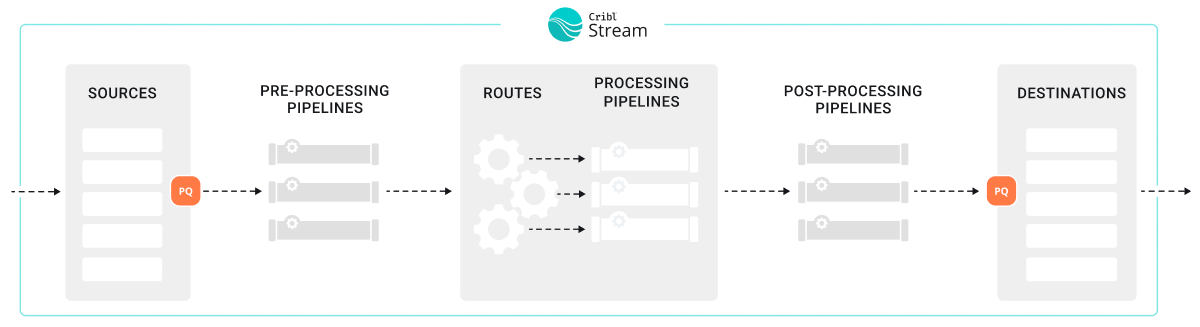
All data processing in Cribl Stream is based on discrete data entities commonly known as events. An event is defined as a collection of key-value pairs (fields). Some Sources deliver events directly, while others might deliver bytestreams that need to be broken up by Event Breakers. Events travel from a Source through Pipelines’ Functions, and on to Destinations.
The internal representation of a Cribl Stream event is as follows:
{
  "_raw": "<body of non-JSON parse-able event>",
  "_time": "<timestamp in UNIX epoch format>",
  "__inputId": "<Id/Name of Source that delivered the event>",
  "__other1": "<Internal field1>",
  "__other2": "<Internal field2>",
  "__otherN": "<Internal fieldN>",
  "key1": "<value1>",
  "key2": "<value2>",
  "keyN": "<valueN>",
  "...": "..."
}Some notes about these representative fields:
Fields that start with a double-underscore are known as internal fields, and each Source can add one or many to each event. For example, Syslog adds both a
__inputIdand a__srcIpPortfield. Internal fields are used only within Cribl Stream, so they are serialized only to Cribl internal Destinations.Upon arrival from a Source, if an event cannot be JSON-parsed, all of its content will be assigned to
_raw.If a timestamp is not configured to be extracted, the current time (in UNIX epoch format) will be assigned to
_time. (When Cribl Stream emits events based on incoming Kafka messages, it handles the_timefield a bit differently.)Cribl reserves the right to change all internal fields that are not documented under Sources or Destinations.
Using Capture
One way to see what an event looks like as it travels through the system is to use the Capture feature. While in Preview (right pane):
Click Capture Data.
In the resulting modal, enter a Filter expression to narrow down the events of interest.
Click Capture… and (optionally) change the default Time and/or Event limits.
Select the desired Where to capture option. There are four options:
- 1. Before the pre-processing Pipeline - Capture events right after they’re delivered by the respective Input (and after PQ, if enabled).
- 2. Before the Routes - Capture events right after the pre-processing Pipeline. before they go down any Routes. (QuickConnect bypasses Routes, and can bypass processing Pipelines.)
- 3. Before the post-processing Pipeline - Capture events right after any Processing Pipeline that handled them, before any post-processing Pipeline.
- 4. Before the Destination - Capture events right after any post-processing Pipeline, before they go out to the configured Destination.