




These docs are for Cribl Api 4.16 and are no longer actively maintained.
See the latest version (4.20).
Authenticate with the Cribl SDKs (Preview)
Preview Feature
The Cribl SDKs are Preview features that are still being developed. We do not recommend using them in a production environment, because the features might not be fully tested or optimized for performance, and related documentation could be incomplete.
Please continue to submit feedback through normal Cribl support channels, but assistance might be limited while the features remain in Preview.
For on-prem deployments, if you’re using SSO/OpenID Connect Authentication, you must toggle on Allow login as Local User in Cribl (see Set Up Fallback Access). You’ll need to be a Local user when you authenticate.
To use
httpsfor on-prem requests, you must configure Transport Layer Security (TLS). If you do not configure TLS, usehttpinstead. Usehttponly for testing in development environments. In production, configure TLS and usehttpsto secure your communications.
The code examples in this topic demonstrate how to authenticate using the Cribl Python SDK for the control plane. Authentication examples are also available for the Cribl Go and TypeScript SDKs for the control plane.
Token Management
Except for the health.get and auth.tokens.get methods, all Cribl SDK requests require you to authenticate with a Bearer token. In Cribl, Bearer tokens are JSON Web Tokens (JWTs).
You must include a valid Bearer token in the appropriate configuration when initializing your SDK client. The Bearer token verifies your identity and ensures secure access to the requested resources. The SDKs automatically manage the Authorization header for all subsequent requests once properly authenticated.
In Cribl.Cloud and hybrid deployments, Bearer tokens are valid for
24hours.In on-prem deployments, Bearer tokens expire according to the value you provide for the Auth token TTL setting at Settings > Global > General Settings > API Server Settings > Advanced. The default setting is
3600seconds (1hour).
In Cribl.Cloud and hybrid deployments, use the client_oauth security scheme. The SDK uses the OAuth credentials that you provide to obtain a Bearer token and refresh the token within its expiration window using the standard OAuth2 flow.
In on-prem deployments, use the bearer_auth security scheme. The SDK uses the username/password credentials that you provide to obtain a Bearer token. Automatically refreshing the Bearer token within its expiration window requires a callback function as shown in the authentication example.
Authenticate in Cribl.Cloud and Hybrid Deployments
To authenticate for the control plane or management plane SDKs, first create an API Credential. The API Credential provides a Client ID and Client Secret, which you must provide in your authentication configuration.
To create an API Credential:
Log in to Cribl.Cloud as an Owner or an Admin.
On the top bar, select Products, and then select Cribl.
In the sidebar, select Organization, and then select API Credentials.
Select Add Credential.
Enter a Name and an optional Description.
In the Organization Permissions drop-down menu, select a Permission to apply for the Credential tokens. Organization Permissions are available on certain plan/license tiers. Without a proper license, all tokens are granted the Admin Permission.
If you choose the User Permission, under Workspace Access, define the desired Permissions for specific Workspaces and Cribl products.
Choosing the Admin or Owner Permission automatically grants admin access to all Workspaces.
To use the API Credential to grant read-only access on individual Cribl Search resources (for example, for a service account that connects to Cribl Search via API), select either the User or Editor Permission on Cribl Search. The Admin Permission automatically grants full access to all Cribl Search resources.
Select Save.
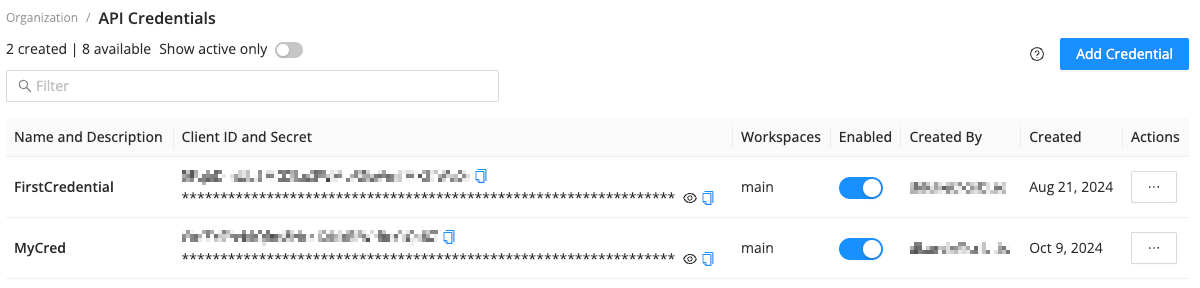
The API Credentials page displays the new API Credential within a few seconds.
The API Credential includes a Client ID and a Client Secret that Organization Owners and Admins can use to generate Bearer tokens. Organization Owners and Admins can view, edit, and disable existing API Credentials. Only Owners can delete API Credentials.
The Client ID and Client Secret are sensitive information and should be kept private.
Next, configure authentication as shown in the following example. Replace the placeholder values in the example request with your OAuth credentials (the Client ID and Client Secret from the API Credential). Base URLs are initialized during authentication, so make sure to replace the placeholder values for your Organizaton ID and Workspace name as well.
If you prefer, you can create and save an .env file to keep sensitive information out of your source code.
"""
Replace the placeholder values for CLIENT_ID, CLIENT_SECRET, ORG_ID,
and WORKSPACE_NAME with your Client ID and Secret, Organization ID, and
Workspace name. To get your CLIENT_ID and CLIENT_SECRET values, follow the steps
at https://docs.cribl.io/cribl-as-code/sdks-auth/#sdks-auth-cloud.
Your Client ID and Secret are sensitive information and should be kept private.

NOTE: This example is for Cribl.Cloud and hybrid deployments only.
"""

import asyncio
from cribl_control_plane import CriblControlPlane
from cribl_control_plane.models import Security, SchemeClientOauth


# Cribl.Cloud configuration: Replace the placeholder values
CLIENT_ID = "your-client-id"  # Replace with your OAuth2 Client ID
CLIENT_SECRET = "your-client-secret"  # Replace with your OAuth2 Client Secret
ORG_ID = "your-org-id"  # Replace with your Organization ID
WORKSPACE_NAME = "main"  # Replace with your Workspace name

base_url = f"https://{WORKSPACE_NAME}-{ORG_ID}.cribl.cloud/api/v1"


async def main():
    # Create authenticated SDK client with OAuth2
    client_oauth = SchemeClientOauth(
        client_id=CLIENT_ID,
        client_secret=CLIENT_SECRET,
        token_url="https://login.cribl.cloud/oauth/token",
        audience="https://api.cribl.cloud",
    )

    security = Security(client_oauth=client_oauth)
    client = CriblControlPlane(server_url=base_url, security=security)
    print(f"✅ Cribl SDK client created for Cribl.Cloud deployment")

    # Validate connection, and list all git branches
    response = await client.versions.branches.list_async()
    branches = "\n\t".join([branch.id for branch in (response.items or [])])
    print(f"✅ Client works! Your list of branches:\n\t{branches}")


if __name__ == "__main__":
    try:
        asyncio.run(main())
    except Exception as error:
        status_code = getattr(error, "status_code", None)
        if status_code == 401:
            print("⚠️ Authentication failed! Check your CLIENT_ID and CLIENT_SECRET.")
        elif status_code == 429:
            print("⚠️ Uh oh, you've reached the rate limit! Try again in a few seconds.")
        else:
print(f"❌ Something went wrong: {error}")"""
Cribl.Cloud Authentication Example
This example demonstrates how to configure authentication on Cribl.Cloud
using OAuth2 credentials.
1. Create an SDK client with OAuth2 client credentials using the
client_oauth security scheme.
2. Automatically handle token exchange and refresh.
3. Validate the connection by checking health status and listing Workspaces.
Prerequisites: Replace the placeholder values for ORG_ID, CLIENT_ID, and
CLIENT_SECRET with your Organization ID and Client ID and Secret.
To get your Client ID and Secret, follow the steps at
https://docs.cribl.io/cribl-as-code/sdks-auth/#sdks-auth-cloud.
Your Client ID and Secret are sensitive information and should be kept private.
NOTE: This example is for Cribl.Cloud only.
It does not require .env file configuration.
"""
import asyncio
from cribl_mgmt_plane import CriblMgmtPlane, errors, models
# Cribl.Cloud configuration: Replace the placeholder values
CLIENT_ID = "your-client-id" # Replace with your OAuth2 Client ID
CLIENT_SECRET = "your-client-secret" # Replace with your OAuth2 Client Secret
ORG_ID = "your-org-id" # Replace with your Organization ID
# Token URL and audience for Cribl.Cloud OAuth2
TOKEN_URL = "https://login.cribl.cloud/oauth/token"
AUDIENCE = "https://api.cribl.cloud"
async def main():
# Create authenticated SDK client with OAuth2
client_oauth = models.SchemeClientOauth(
client_id=CLIENT_ID,
client_secret=CLIENT_SECRET,
token_url=TOKEN_URL,
audience=AUDIENCE,
)
security = models.Security(client_oauth=client_oauth)
async with CriblMgmtPlane(security=security) as cmp_client:
try:
print("✅ Cribl.Cloud Management Plane SDK client created")
# Validate connection with health check
health_response = await cmp_client.health.get_async()
status = health_response.status or "unknown" # type: ignore
print(f"✅ Health check passed! Status: {status}")
# List all Workspaces for the Organization
workspaces_response = await cmp_client.workspaces.list_async(
organization_id=ORG_ID
)
items = workspaces_response.items # type: ignore
count = workspaces_response.count # type: ignore
message = f"✅ Client works! Found {count} Workspace(s):" if items else f"✅ Client works! No Workspaces found for Organization {ORG_ID}"
print(message)
for ws in items:
alias_display = f" ({ws.alias})" if ws.alias else ""
print(f" • {ws.workspace_id}{alias_display} - {ws.state.value} in {ws.region.value}")
except errors.CriblMgmtPlaneError as e:
if e.status_code == 401:
print("⚠️ Authentication failed! Check your CLIENT_ID and CLIENT_SECRET.")
elif e.status_code == 429:
print("⚠️ Uh oh, you've reached the rate limit! Try again in a few seconds.")
else:
print(f"❌ Something went wrong: {e.message}")
if __name__ == "__main__":
asyncio.run(main())
Authenticate in On-Prem Deployments
To authenticate in on-prem deployments, provide your username and password in the authentication request. Base URLs are initialized during authentication, so make sure to replace the placeholder value for your server URL as well. Your username and password are sensitive information and should be kept private.
On-prem deployments use a callback function to refresh the Bearer token when it expires.
If you prefer, you can create and save an .env file to keep sensitive information out of your source code.
"""
Replace the placeholder values for ONPREM_SERVER_URL, ONPREM_USERNAME, and
ONPREM_PASSWORD with your server URL and username/password credentials. Your
credentials are sensitive information and should be kept private.

NOTE: This example is for on-prem deployments only.
"""

import asyncio
import base64
import json
from datetime import datetime, timedelta, timezone

from cribl_control_plane import CriblControlPlane
from cribl_control_plane.models import Security

# On-prem configuration: Replace the placeholder values
ONPREM_SERVER_URL = "http://localhost:9000"  # Replace with your server URL
ONPREM_USERNAME = "admin"  # Replace with your username
ONPREM_PASSWORD = "admin"  # Replace with your password

BASE_URL = f"{ONPREM_SERVER_URL}/api/v1"

# Token cache
_cached_token = None
_token_expires_at = None


def _get_jwt_exp(token: str) -> datetime:
    payload_b64 = token.split(".")[1]
    padding = "=" * (-len(payload_b64) % 4)
    payload = json.loads(base64.urlsafe_b64decode(payload_b64 + padding).decode("utf-8"))
    exp = payload.get("exp")
    if exp is None:
        raise ValueError("Token missing 'exp' field")
    return datetime.fromtimestamp(exp, tz=timezone.utc)


async def main():
    # Create client for retrieving Bearer token
    client = CriblControlPlane(server_url=BASE_URL)

    def callback() -> Security:
        global _cached_token, _token_expires_at

        # Check cache
        now = datetime.now(timezone.utc)
        if _cached_token and _token_expires_at and (now + timedelta(seconds=3)) < _token_expires_at:
            return Security(bearer_auth=_cached_token)

        # Retrieve Bearer token initially and refresh automatically when it expires
        response = client.auth.tokens.get(
            username=ONPREM_USERNAME, password=ONPREM_PASSWORD
        )
        token = response.result.token
        _token_expires_at = _get_jwt_exp(token)
        _cached_token = token
        return Security(bearer_auth=token)

    # Create authenticated SDK client
    client = CriblControlPlane(server_url=BASE_URL, security=callback)
    print(f"✅ Authenticated SDK client created for on-prem server")

    # Validate connection and list all git branches
    response = await client.versions.branches.list_async()
    branches = "\n\t".join([branch.id for branch in (response.items or [])])
    print(f"✅ Client works! Your list of branches:\n\t{branches}")


if __name__ == "__main__":
    try:
        asyncio.run(main())
    except Exception as error:
        status_code = getattr(error, "status_code", None)
        if status_code == 401:
            print("⚠️ Authentication failed! Check your USERNAME and PASSWORD.")
        else:
            print(f"❌ Something went wrong: {error}")