




Custom AI Providers (Bring Your Own Model)
Custom AI Providers enable a Bring Your Own Model (BYOM) approach, allowing you to connect your own large language model (LLM) backend to Cribl AI features. This gives you the flexibility to route supported Cribl Copilot capabilities through your preferred AI infrastructure instead of using the default Cribl-managed backend.
Why Use Custom AI Providers?
By default, Cribl-managed AI features use models selected and operated by Cribl, with traffic following Cribl-managed routes and service contracts.
While this default configuration is secure, many enterprises require deeper levels of control. Custom AI providers allow you to replace the default backend with your own approved AI vendors, ensuring that your keys, models, and traffic stay within your existing cloud governance boundaries.
Integrating your own AI backend provides the following key benefits for your deployment:
- Vendor standardization: Use the AI providers your organization has already vetted and standardized on.
- Data privacy and compliance: Keep AI traffic within specific regulatory or contractual boundaries. This is essential for organizations with strict data residency requirements or those operating in highly regulated industries.
- Direct governance: Maintain full control over your API keys and the specific model versions used for inference.
- Cost management: Gain direct visibility into how AI inference is billed. By using your own provider contracts, you can apply existing cloud credits and committed spend to your Cribl AI usage.
How Custom AI Providers Work
Custom AI providers add a configurable backend to the existing Cribl AI architecture. This setup allows the platform to route agentic workflows through a local service that communicates directly with your self-managed models (such as Anthropic or OpenAI) instead of the default Cribl AI provider.
The goal is to route supported agentic workflows through an AI service that can call either:
- Your self-managed models (for example, Anthropic or OpenAI), or
- The Cribl cloud-hosted AI backend, where needed.
Main Components
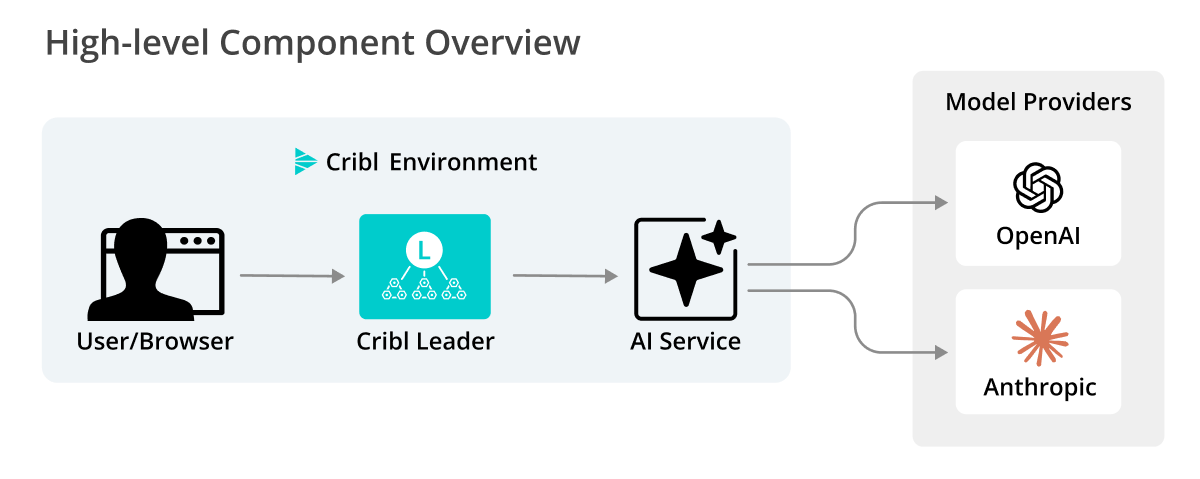
The following core components of the custom AI provider feature work together to route and process AI requests within your managed environment:
- Cribl Leader Node: The Leader Node serves the UI and API. All AI requests initiated in the UI are first received by the Leader.
- AI service: A service running on the Leader Node that manages AI agents. When a custom AI provider is enabled, it calls your configured AI provider directly using your stored credentials.
- Cloud AI backend: Cribl-hosted backend. This continues to handle workflows that are not yet migrated to the local AI Service or customer-managed providers.
Example Workflow
When you plug in a custom AI provider, you are essentially replacing the “brain” behind Cribl’s AI features. Once configured in AI Settings, the Cribl Leader Node stops sending requests to the default Cribl cloud and instead sends them directly to your hosted model.
To see this in practice, consider the KQL assistant in Cribl Search. Without needing to know Kusto Query Language, an analyst can use your custom LLM to investigate data.
Natural language input: An analyst types, “Show me the top 10 source IPs with the most failed login attempts in the last hour” into the Copilot search box.
Custom inference: Cribl sends this request to your configured provider (such as Anthropic or OpenAI).
KQL generation: Your LLM processes the request and returns the specific KQL syntax:
dataset="auth_logs" | where status=="failure" | summarize count() by src_ip | top 10 by count_Execution: Cribl Search executes the query in KQL syntax against your data.
Supported Custom AI Providers and Features
Review the following sections for details on currently supported custom AI providers and the specific Copilot features they power.
Supported providers currently include:
- Anthropic via Amazon Bedrock
- OpenAI via Microsoft Foundry
Cribl is committed to an agnostic AI strategy. While initial support focuses on AWS and Azure ecosystems, the framework is designed to expand to additional model families and providers in future releases.
Deployment Limitations
Before configuring a custom AI provider, note the following constraints:
- Single provider scope: You can configure only one custom AI provider per Workspace (in Cribl.Cloud) or Global setting (on-prem).
- Available in Cribl.Cloud commercial environments only: Custom AI provider support is not currently available for Cribl.Cloud Government environments.
- Inference only: Custom AI providers are used for inference only. Fine-tuned or custom-trained models are not supported at this time.
Supported Copilot Features
When a custom AI provider is active, the following features route through your managed LLM:
- KQL assistant: Translating natural language into Kusto Query Language (KQL) in Cribl Search.
- Notebook summaries: Generating natural-language explanations of Search Notebook logic and findings.
- Git commit messages: Suggesting descriptive summaries when saving or committing configuration changes.
- Guard rule generation: Drafting or refining detection rules in Cribl Guard.
- Cribl Search suggestions: Generating query refinements or follow-up suggestions in the Search bar.
- Local Cribl Search assistance: Translating natural-language descriptions into queries against local data Sources.
Capabilities Using Cribl-Managed Models
The following features currently rely on the global Copilot chat path and continue to use the default Cribl-managed models:
- All Copilot chat experiences: The in-product chatbot, the Cribl Docs assistant, and the Slack community app.
- Copilot Editor in Cribl Stream: Log-type detection, schema suggestions, and AI-assisted Pipeline editing.
- Visualizations: Natural-language suggestions that drive “Visualize this dataset” flows in Cribl Search.